gobo-vscode
Compile And Run in the Debug Console panel
You can easily compile and run Eiffel systems directly from the
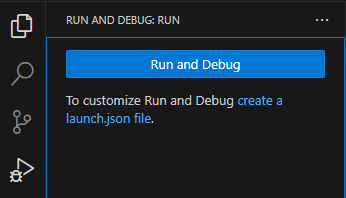
Run And Debug panel. When you click create a launch.json file,
VS Code automatically generates a file pre-filled with several
Launch Configurations. These can be used as-is or customized for
more advanced workflows.
The pre-filled configurations are:
- Compile & Run With Workspace ECF File
- Compile With Workspace ECF File
- Run With Workspace ECF File
- Compile & Run With Current ECF File
- Compile With Current ECF File
- Run With Current ECF File
- Compile & Run Eiffel System
- Compile Eiffel System
- Run Eiffel System
- Compile & Run Current Eiffel File
- Compile Current Eiffel File
- Run Current Eiffel File
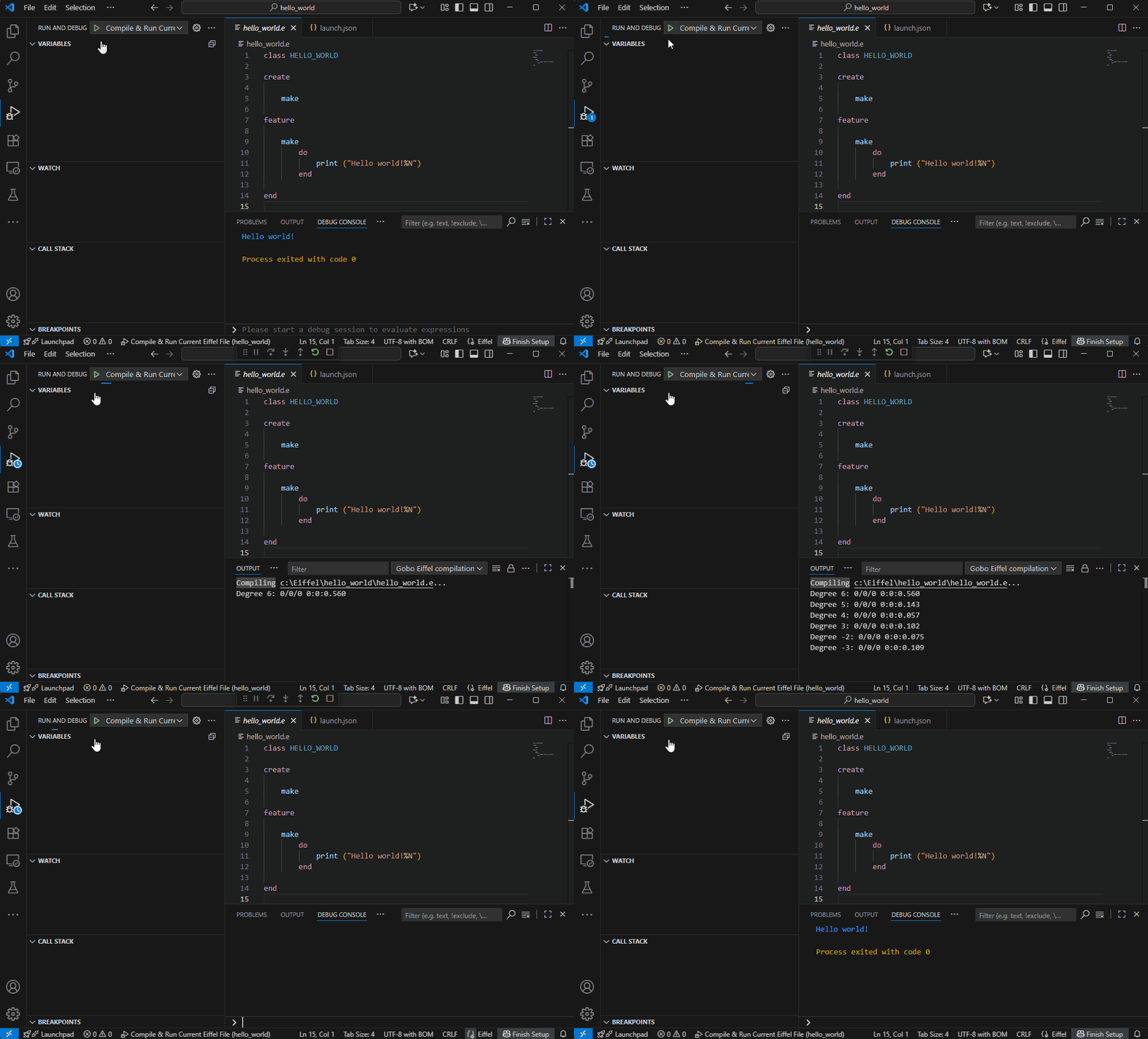
Compilation output appears in the Output panel, whereas the compiled executable runs in the Debug Console panel.
To run the compiled executable in the Terminal panel, use the commands available in the Command Palette and contextual menus.
⚠️ Limitations: Breakpoints are not currently supported when running an Eiffel system.
Compile & Run With Workspace ECF File
{
	"name": "Compile & Run With Workspace ECF File",
	"type": "eiffel",
	"request": "launch",
	"compilationOptions": [],
	"buildDir": "",
	"args": [],
	"workingDir": "",
	"environmentVariables": {}
}
This configuration compiles and runs the Eiffel system described by the workspace ECF file.
Compilation Options
Use compilationOptions to pass flags to the compiler. For example:
"compilationOptions": ["--finalize"]
compiles an optimized executable for release. See the full list of options in the Gobo Eiffel Compiler documentation.
Build Directory
By default, executables and intermediate files are generated in the same folder
as the ECF file.
The executable name is inferred from the ECF description.
Intermediate files go into a .gobo subfolder.
To change the output location:
"buildDir": "path/to/my/build/folder"
Supports environment variables of the form $VAR or ${VAR}.
Arguments
Pass command-line arguments to the compiled executable:
"args": ["arg1", "arg2"]
Working Directory
Specify the working directory for execution of the compiled executable (default: folder containing the ECF file):
"workingDir": "path/to/my/working/folder"
Supports environment variables of the form $VAR or ${VAR}.
Environment Variables
Set environment variables for compilation and/or execution:
"environmentVariables": {
	"VAR1": "value1",
	"VAR2": "value2"
}
Compile With Workspace ECF File
{
	"name": "Compile With Workspace ECF File",
	"type": "eiffel",
	"request": "launch",
	"compilationOptions": [],
	"buildDir": "",
	"environmentVariables": {},
	"compileOnly": true
}
This configuration compiles the Eiffel system described by the workspace ECF file but does not execute the compiled executable.
compileOnly prevents execution.
All other settings work as described above.
Run With Workspace ECF File
{
	"name": "Run With Workspace ECF File",
	"type": "eiffel",
	"request": "launch",
	"buildDir": "",
	"args": [],
	"workingDir": "",
	"environmentVariables": {},
	"runOnly": true
}
This configuration runs an already-compiled executable for the Eiffel system described by the workspace ECF file, in the Debug Console panel.
runOnly disables compilation.
buildDir must still point to the folder containing the executable.
All other settings work as described above.
Compile & Run With Current ECF File
{
	"name": "Compile & Run With Current ECF File",
	"type": "eiffel",
	"request": "launch",
	"ecfTarget": "",
	"compilationOptions": [],
	"buildDir": "",
	"args": [],
	"workingDir": "",
	"environmentVariables": {}
}
This configuration compiles and runs the Eiffel system described by the ECF file currently open in the Editor.
Learn more about ECF files in the Gobo Eiffel documentation.
ECF Target
If the ECF defines multiple targets, the last one is used by default. Specify another target:
"ecfTarget": "my_target"
Compilation Options
Use compilationOptions to pass flags to the compiler. For example:
"compilationOptions": ["--finalize"]
compiles an optimized executable for release. See the full list of options in the Gobo Eiffel Compiler documentation.
Build Directory
By default, executables and intermediate files are generated in the same folder
as the ECF file.
The executable name is inferred from the ECF description.
Intermediate files go into a .gobo subfolder.
To change the output location:
"buildDir": "path/to/my/build/folder"
Supports environment variables of the form $VAR or ${VAR}.
Arguments
Pass command-line arguments to the compiled executable:
"args": ["arg1", "arg2"]
Working Directory
Specify the working directory for execution of the compiled executable (default: folder containing the ECF file):
"workingDir": "path/to/my/working/folder"
Supports environment variables of the form $VAR or ${VAR}.
Environment Variables
Set environment variables for compilation and/or execution:
"environmentVariables": {
	"VAR1": "value1",
	"VAR2": "value2"
}
Compile With Current ECF File
{
	"name": "Compile With Current ECF File",
	"type": "eiffel",
	"request": "launch",
	"ecfTarget": "",
	"compilationOptions": [],
	"buildDir": "",
	"environmentVariables": {},
	"compileOnly": true
}
This configuration compiles the Eiffel system described by the ECF file currently open in the Editor but does not execute the compiled executable.
compileOnly prevents execution.
All other settings work as described above.
Run With Current ECF File
{
	"name": "Run With Current ECF File",
	"type": "eiffel",
	"request": "launch",
	"ecfTarget": "",
	"buildDir": "",
	"args": [],
	"workingDir": "",
	"environmentVariables": {},
	"runOnly": true
}
This configuration runs an already-compiled executable for the Eiffel system described by the ECF file currently open in the Editor, in the Debug Console panel.
runOnly disables compilation.
buildDir must still point to the folder containing the executable.
All other settings work as described above.
Compile & Run Eiffel System
{
	"name": "Compile & Run Eiffel System",
	"type": "eiffel",
	"request": "launch",
	"ecfFile": "${GOBO}/library/common/example/hello_world/system.ecf",
	"ecfTarget": "hello_world",
	"compilationOptions": [],
	"buildDir": "",
	"args": [],
	"workingDir": "",
	"environmentVariables": {}
}
This configuration is similar to
Compile & Run With Current ECF File
above, except that the ECF file is
explicitly specified with ecfFile instead of using the file currently
open in the Editor. This is just a template to compile and run the
Hello World example included in the Gobo Eiffel installation.
Replace ecfFile and ecfTarget with your own values.
ecfFile supports environment variables of the form $VAR or ${VAR}.
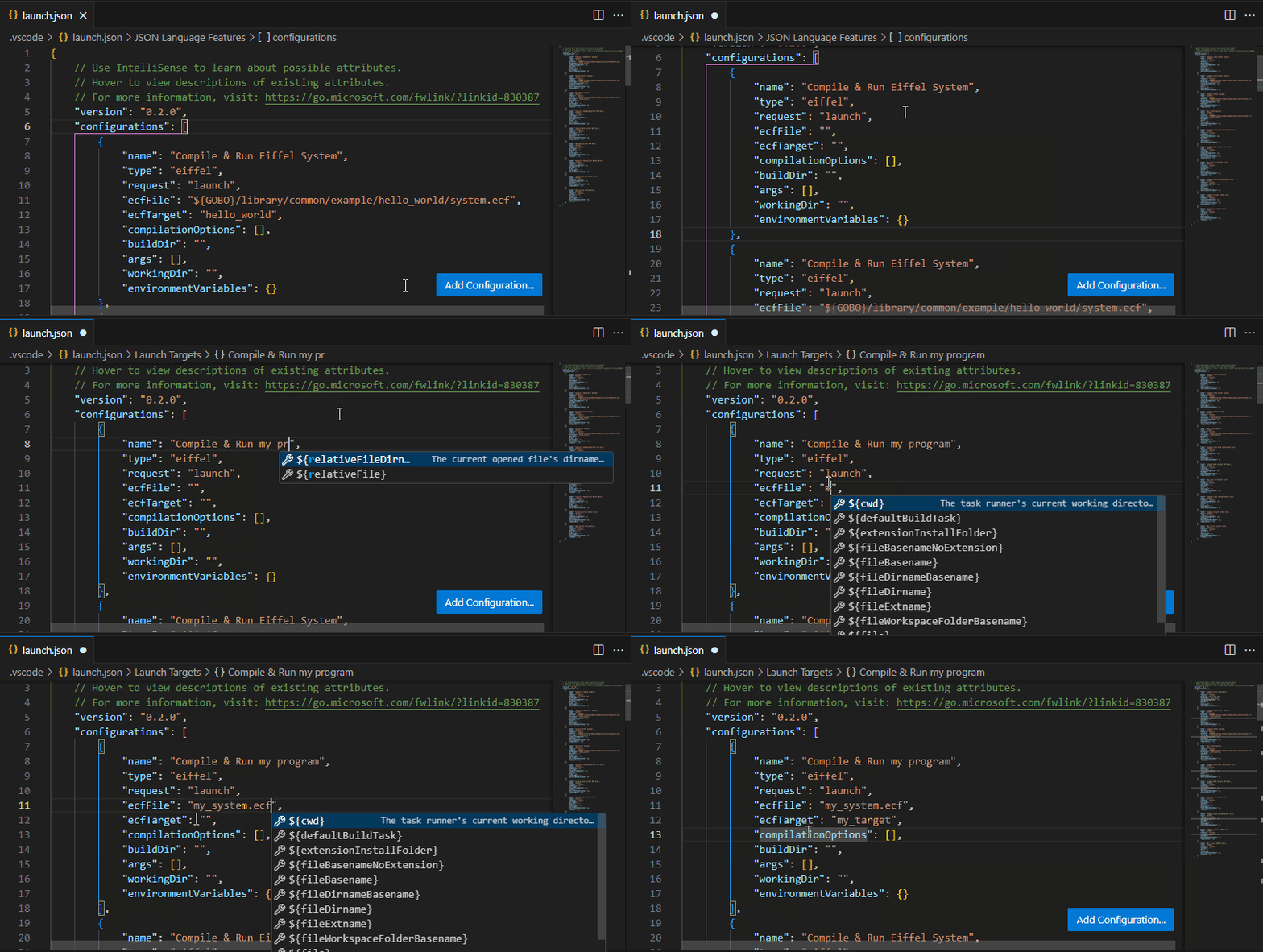
If you need to compile several Eiffel systems, or need several compilation modes or several sets of arguments, you can add more such Launch Configurations by clicking on the Add Configuration button and selecting Gobo Eiffel: Compile & Run Eiffel System.
Compile Eiffel System
{
	"name": "Compile Eiffel System",
	"type": "eiffel",
	"request": "launch",
	"ecfFile": "${GOBO}/library/common/example/hello_world/system.ecf",
	"ecfTarget": "hello_world",
	"compilationOptions": [],
	"buildDir": "",
	"environmentVariables": {},
	"compileOnly": true
}
This configuration compiles the Eiffel system described by the ECF file
ecfFile but does not execute the compiled executable.
All settings work as described above.
If you need to compile several Eiffel systems, or need several compilation modes, you can add more such Launch Configurations by clicking on the Add Configuration button and selecting Gobo Eiffel: Compile Eiffel System.
Run Eiffel System
{
	"name": "Run Eiffel System",
	"type": "eiffel",
	"request": "launch",
	"ecfFile": "${GOBO}/library/common/example/hello_world/system.ecf",
	"ecfTarget": "hello_world",
	"buildDir": "",
	"args": [],
	"workingDir": "",
	"environmentVariables": {},
	"runOnly": true
}
This configuration runs an already-compiled executable for the Eiffel
system described by the ECF file ecfFile, in the Debug Console panel.
All settings work as described above.
If you need to compile several Eiffel systems, or need several sets of arguments, you can add more such Launch Configurations by clicking on the Add Configuration button and selecting Gobo Eiffel: Run Eiffel System.
Compile & Run Current Eiffel File
{
	"name": "Compile & Run Current Eiffel File",
	"type": "eiffel",
	"request": "launch",
	"compilationOptions": [],
	"buildDir": "",
	"args": [],
	"workingDir": "",
	"environmentVariables": {}
}
This configuration compiles the Eiffel class currently open in the Editor and runs it in the Debug Console panel.
Compilation Options
Use compilationOptions to pass flags to the compiler. For example:
"compilationOptions": ["--finalize"]
compiles an optimized executable for release. See the full list of options in the Gobo Eiffel Compiler documentation.
Build Directory
By default, executables and intermediate files are generated in the same folder as the Eiffel file. The executable name matches the Eiffel class name, e.g.:
HELLO_WORLD→hello_world.exeon WindowsHELLO_WORLD→hello_worldon Linux/macOS
Intermediate files go into a .gobo subfolder.
To change the output location:
"buildDir": "path/to/my/build/folder"
Supports environment variables of the form $VAR or ${VAR}.
Arguments
Pass command-line arguments to the compiled executable:
"args": ["arg1", "arg2"]
Working Directory
Specify the working directory for execution of the compiled executable (default: folder containing the Eiffel file):
"workingDir": "path/to/my/working/folder"
Supports environment variables of the form $VAR or ${VAR}.
Environment Variables
Set environment variables for compilation and/or execution:
"environmentVariables": {
	"VAR1": "value1",
	"VAR2": "value2"
}
Compile Current Eiffel File
{
	"name": "Compile Current Eiffel File",
	"type": "eiffel",
	"request": "launch",
	"compilationOptions": [],
	"buildDir": "",
	"environmentVariables": {},
	"compileOnly": true
}
This configuration compiles the Eiffel class currently open in the Editor but does not execute the compiled executable.
compileOnly prevents execution.
All other settings work as described above.
Run Current Eiffel File
{
	"name": "Run Current Eiffel File",
	"type": "eiffel",
	"request": "launch",
	"buildDir": "",
	"args": [],
	"workingDir": "",
	"environmentVariables": {},
	"runOnly": true
}
This configuration runs an already-compiled executable for the Eiffel class currently open in the Editor, in the Debug Console panel.
runOnly disables compilation.
buildDir must still point to the folder containing the executable.
All other settings work as described above.