gobo-vscode
Compile And Run in the Terminal panel
You can easily compile and run Eiffel systems using commands available in the Command Palette and contextual menus. The commands are:
- Compile & Run With Workspace ECF File
- Compile With Workspace ECF File
- Run With ECF Workspace File
- Lint With ECF Workspace File
- Compile & Run With Current ECF File
- Compile With Current ECF File
- Run With ECF Current File
- Lint With ECF Current File
- Compile & Run Eiffel File
- Compile Eiffel File
- Run Eiffel File
- Lint Eiffel File
They are prefixed with Gobo Eiffel: in the Command Palette. So you
can open the Command Palette with Ctrl+Shift+P (or Cmd+Shift+P on
MacOS) and type Gobo Eiffel to see available commands.
The same commands are also available from the right-click contextual menus
for Eiffel files (.e) or ECF files (.ecf) in both the Editor and
Explorer panels.
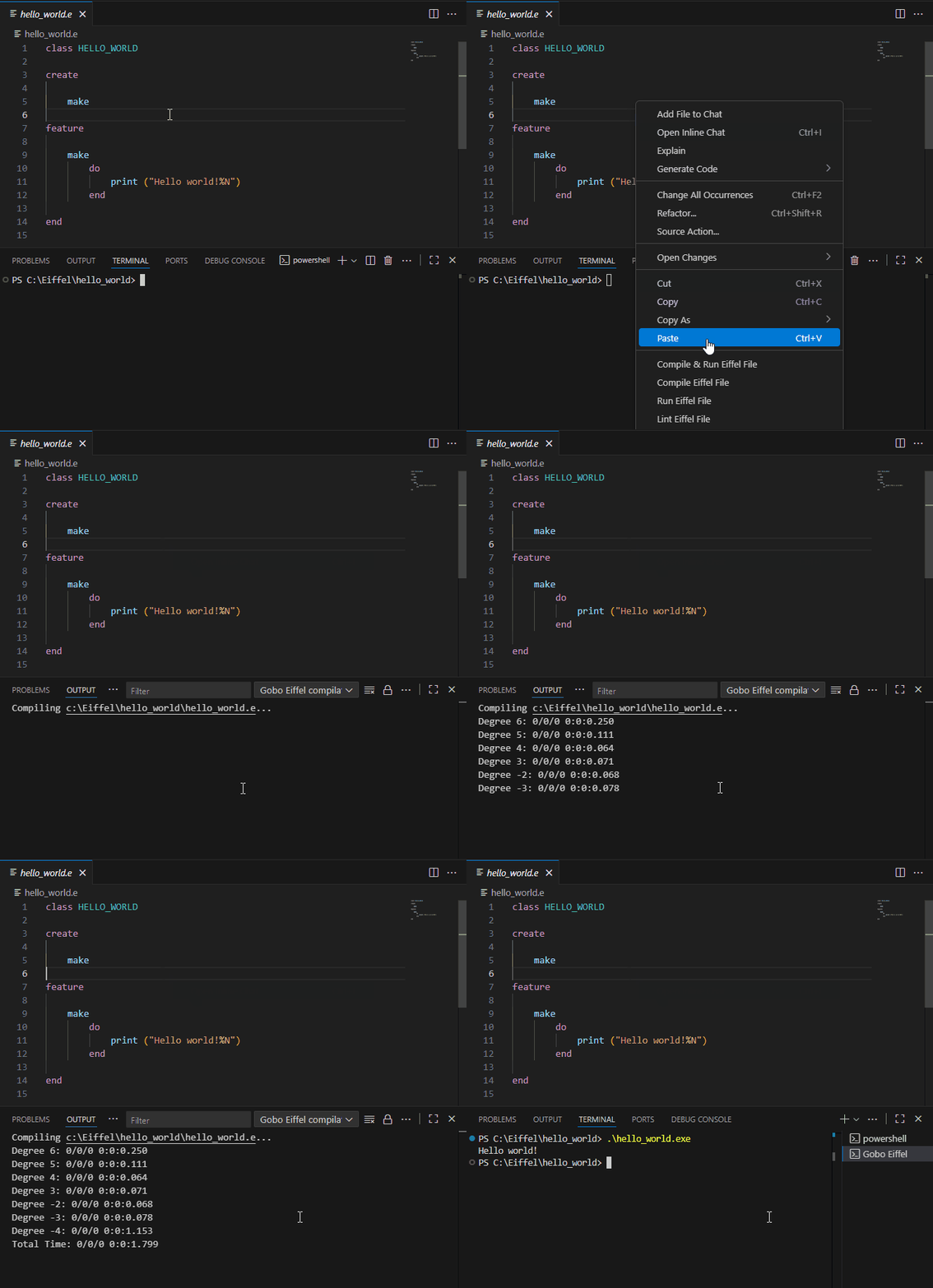
Compilation output appears in the Output panel, whereas the compiled executable runs in the Terminal panel.
To run the compiled executable in the Debug Console panel, use the launch configurations available in the Debug And Run panel.
Compile & Run With Workspace ECF File
This command compiles the Eiffel system described by the workspace ECF file and runs it in the Terminal panel.
This command is configurable using the values (compilation options, arguments,
etc.) specified in the configuration
Compile & Run With Workspace ECF File
if found in the launch.json file.
Compile With Workspace ECF File
This command compiles the Eiffel system described by the worspace ECF file, but does not execute the compiled executable.
This command is configurable using the values (compilation options, arguments,
etc.) specified in the configuration
Compile With Workspace ECF File
if found in the launch.json file.
Run With Workspace ECF File
This command runs an already-compiled executable for the Eiffel system described by the workspace ECF file, in the Terminal panel.
This command is configurable using the values (compilation options, arguments,
etc.) specified in the configuration
Run With Workspace ECF File
if found in the launch.json file.
Lint With Workspace ECF File
This command runs Gobo Eiffel Lint on the Eiffel system described by the workspace ECF file. Output appears in the Output panel.
This command is configurable using the values (compilation options, etc.)
specified in the configuration
Compile With Workspace ECF File
if found in the launch.json file.
Compile & Run With Current ECF File
This command compiles the Eiffel system described by the ECF file currently open in the Editor (or currently selected in the Explorer panel) and runs it in the Terminal panel.
Learn more about ECF files in the Gobo Eiffel documentation.
This command is configurable using the values (compilation options, arguments,
etc.) specified in the configuration
Compile & Run With Current ECF File
if found in the launch.json file.
Compile With Current ECF File
This command compiles the Eiffel system described by the ECF file currently open in the Editor (or currently selected in the Explorer panel), but does not execute the compiled executable.
This command is configurable using the values (compilation options, arguments,
etc.) specified in the configuration
Compile With Current ECF File
if found in the launch.json file.
Run With Current ECF File
This command runs an already-compiled executable for the Eiffel system described by the ECF file currently open in the Editor (or currently selected in the Explorer panel), in the Terminal panel.
This command is configurable using the values (compilation options, arguments,
etc.) specified in the configuration
Run With Current ECF File
if found in the launch.json file.
Lint With Current ECF File
This command runs Gobo Eiffel Lint on the Eiffel system described by the ECF file currently open in the Editor (or currently selected in the Explorer panel). Output appears in the Output panel.
This command is configurable using the values (compilation options, etc.)
specified in the configuration
Compile With Current ECF File
if found in the launch.json file.
Compile & Run Eiffel File
This command compiles the Eiffel class currently open in the Editor (or currently selected in the Explorer panel) and runs it in the Terminal panel.
This command is configurable using the values (compilation options, arguments,
etc.) specified in the configuration
Compile & Run Current Eiffel File
if found in the launch.json file.
Compile Eiffel File
This command compiles the Eiffel class currently open in the Editor (or currently selected in the Explorer panel) but does not execute the compiled executable.
This command is configurable using the values (compilation options, etc.)
specified in the configuration
Compile Current Eiffel File
if found in the launch.json file.
Run Eiffel File
This command runs an already-compiled executable for the Eiffel class currently open in the Editor (or currently selected in the Explorer panel), in the Terminal panel.
This command is configurable using the values (arguments, etc.) specified in
the configuration
Run Current Eiffel File
if found in the launch.json file.
Lint Eiffel File
This command runs Gobo Eiffel Lint on the Eiffel class currently open in the Editor (or currently selected in the Explorer panel) and on Eiffel classes it depends on. Output appears in the Output panel.
This command is configurable using the values (compilation options, etc.)
specified in the configuration
Compile Current Eiffel File
if found in the launch.json file.